Reliable electricity shapes daily life more than most people realize—until the power goes out. A portable solar generator offers a practical alternative: it pairs solar panels with a battery station to deliver clean, quiet power without gas or fumes. Safe for indoor use and easy to move, it works just as well in an apartment as it does at a campsite. But choosing the right model takes more than comparing wattage. Capacity, output, charging speed, and portability all need to match how you actually live. This article breaks down the key steps to making that decision—clearly and practically.
1. Step 1: Decide How You’ll Use It
Every smart purchase begins with an honest look at daily habits and potential emergencies. Some households want a backup solution for occasional power outages that last a few hours, while others prepare for multi-day disruptions during storms. Campers and van travelers may prioritize lightweight systems that can recharge phones, cameras, and small appliances off-grid. Remote workers might need reliable backup for laptops, routers, and monitors to prevent interruptions during meetings. When thinking through these scenarios, it helps to imagine a normal day without wall outlets and list which devices must keep running. For families seeking a flexible option that handles both home backup and outdoor activities, systems like the Anker SOLIX solar generator are designed to power essential devices reliably, making them easier to integrate into everyday routines without complicated setup.
2. Step 2: Match Capacity to Your Devices
Small units: phones, laptops, lights
Smaller-capacity units are ideal for charging smartphones, tablets, cameras, and laptops during short outages or outdoor trips. A typical smartphone battery uses less than 20Wh, and a laptop may require between 50Wh and 100Wh per charge, so even modest generators can handle several full charges. LED lights, Wi-Fi routers, and small fans also consume relatively low power, making them practical for compact systems. These smaller units are easier to move around the house or pack into a car trunk. For apartment dwellers with limited storage, size and simplicity often matter more than extended runtime. Matching a smaller generator to low-demand electronics keeps costs reasonable while covering everyday essentials.
Large units: fridges, freezers, medical gear
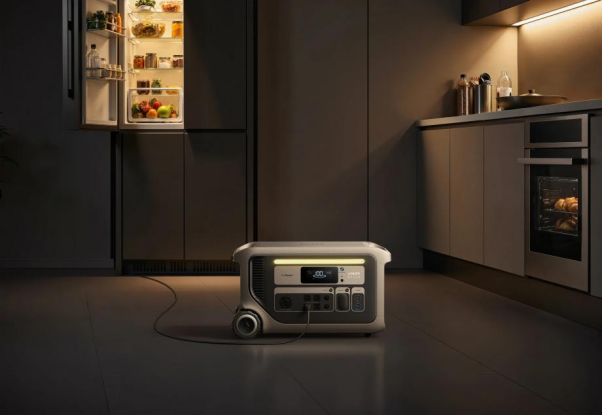
Larger-capacity generators are better suited for refrigerators, freezers, and critical medical equipment. A standard refrigerator may use 100 to 200 watts while running but cycles on and off throughout the day, requiring substantial stored energy to last overnight. Medical devices such as CPAP machines or mobility equipment demand consistent, dependable power. In longer outages, keeping food safe prevents additional expense and stress. These higher-capacity systems can also support multiple devices simultaneously, such as lights, routers, and kitchen appliances. For households in areas with frequent storms, investing in greater capacity can mean maintaining comfort and safety for extended periods.
3. Step 3: Confirm It Can Start Your Gear
Check continuous wattage for running loads
Continuous wattage refers to the steady power a generator can supply while devices are operating. For example, a television might require 150 watts, while a microwave could need 1,000 watts during use. Adding together the running wattage of devices that may operate simultaneously provides a realistic baseline. Choosing a generator with a comfortable margin above that number helps avoid overloads. This approach ensures smoother performance when multiple household members plug in devices at once. Clear labeling of continuous output simplifies comparison between models.
Check surge wattage for motors and compressors
Surge wattage is the temporary boost needed to start appliances with motors or compressors. Refrigerators, air conditioners, and power tools often draw two to three times their running wattage for a brief moment at startup. Without sufficient surge capacity, the generator may shut down automatically. Understanding this difference prevents confusion when a device fails to start despite appearing within the power limit. Reading appliance labels or manuals helps estimate these startup requirements. Selecting a generator with adequate surge support ensures reliable performance during real-world use.
4. Step 4: Count What You Plug In
AC outlets for standard appliances
AC outlets allow traditional household plugs to connect directly, making them essential for appliances like coffee makers, televisions, and kitchen tools. The number of outlets matters when several devices need power simultaneously. During outages, families often want to run lights, a fridge, and charging cables at the same time. Having multiple AC ports reduces the need for extension strips. Well-designed spacing between outlets also accommodates bulky plugs. Confirming these practical details prevents inconvenience later.
USB-C and DC ports for modern devices
Modern electronics increasingly rely on USB-C and DC connections. Fast-charging smartphones, tablets, drones, and laptops benefit from high-wattage USB-C ports that eliminate bulky adapters. Dedicated DC ports can power car accessories or portable coolers during road trips. Having these options built into the generator simplifies cable management. It also increases efficiency, since direct DC charging reduces conversion losses. Counting how many USB and DC ports are available helps ensure daily devices remain powered without compromise.
5. Step 5: Size Solar Input to Your Sunlight
Faster input means shorter recharge times
Higher solar input ratings allow more energy to flow into the battery when sunlight is strong. In practical terms, this can reduce recharge time from an entire day to just a few hours under good conditions. For households relying on solar during outages, quicker recharging means more consistent access to electricity. Weather patterns also matter, as cloudy days reduce effective input. A system capable of handling higher input can better take advantage of limited sunny periods. This flexibility improves reliability across different seasons.
Match panel wattage to generator limits
Every portable solar power generator has a maximum solar input rating, and panel combinations should stay within that limit. Oversizing panels beyond what the generator accepts will not increase charging speed. Reviewing specifications ensures compatibility between panels and the power station. Adjustable or expandable systems allow additional panels if future needs grow. Careful matching prevents wasted investment and improves overall efficiency. Understanding these limits supports smarter long-term planning.

6. Step 6: Weigh Portability vs. Power
Greater power typically comes with increased size and weight. Compact units are easier to carry upstairs, load into vehicles, or reposition around the house. Larger systems may include wheels or handles to improve mobility, but still require more storage space. Considering where the generator will be stored and how often it will be moved helps guide the decision. For occasional camping trips, lightweight portability may matter most. For whole-home backup needs, higher capacity and output may justify additional bulk.
Conclusion
Choosing the right solar generator involves balancing real-life usage, device requirements, charging speed, and portability. By carefully evaluating how electricity is used at home or outdoors, matching capacity to essential appliances, and confirming output and port options, buyers can avoid common mistakes. A well-selected portable solar power generator becomes a dependable part of daily life rather than an emergency afterthought. With thoughtful planning and realistic expectations, it is possible to secure reliable, quiet power that supports both comfort and preparedness.